Two Tools Built from a Print Shop’s Workflow
A consulting engagement that turned repetitive production tasks into two focused browser tools.
Overview
A print shop approached Brunix to ask whether I could speed up parts of its production process. Over three days of online conversations and workflow observation, I learned how different designers worked, where tasks slowed down, and what happened when revisions arrived.
Two bottlenecks stood out: preparing PDFs after content changes and renumbering images for a legacy system. I designed and built two independent tools, PDF Buddy and SortAndGo, testing them with the teams as they developed.
Role: Discovery, product design, development, and deployment
Approach: Real work samples, small releases, and direct client feedback
Development effort: Under 10 hours for PDF Buddy and under 5 hours for SortAndGo, estimated separately from discovery
PDF Buddy: simplifying PDF preparation
The problem
Designers created educational materials in Illustrator and exported individual PDFs. They then assembled related files into larger documents using Acrobat and generated thumbnails using Photoshop, either in batches or one at a time.
Teacher reviews made this workflow harder. A request to change an illustration and move page 15 to position 13 triggered several additional steps: renaming files, rebuilding the combined PDF, and regenerating or renaming thumbnails.
There was also a less visible source of confusion. Renaming a PDF did not update its internal title. A teacher could open 13.pdf and still see 15 in the browser tab.
Start with the title
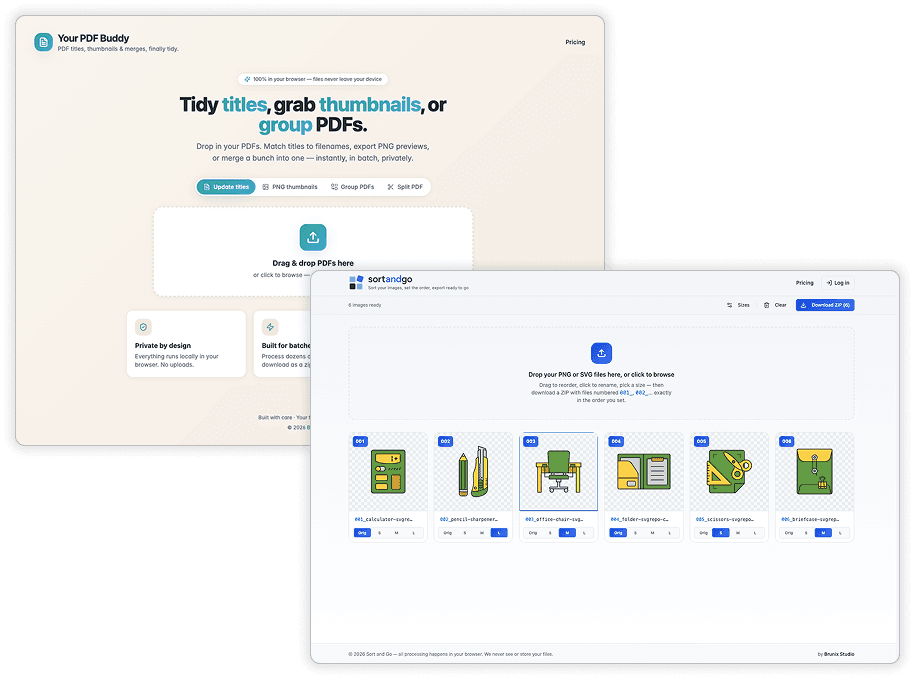
I built the first version in Lovable around that specific problem. In less than 20 minutes, it was published and ready for the designer to test with real files.
The tool could update internal PDF titles from filenames or accept a custom title. The designer dropped in the files, processed them, and checked the result.

From there, I added PDF grouping, then thumbnail generation. Splitting documents came later, in response to an occasional task the team needed to handle.
Refine around actual use
As the team used the tool, I added flexibility without changing the core workflow. Thumbnail dimensions became adjustable, grouped PDFs could be named before export, and split pages could use naming prefixes and suffixes.
These controls reduced cleanup after processing and made the tool useful beyond the original client’s exact requirements.
In use
The print shop has used PDF Buddy for six months and pays through a directly negotiated credit arrangement. We also agreed that I could offer the tool to other paying customers. Self-service payments are not yet implemented.
The team reports that work previously involving hours of processing, checking, and switching between applications now happens through the tool. I have not measured an average time saving across their tasks.

SortAndGo: replacing manual renumbering
The problem
Another team used a legacy system that displayed images in alphanumeric filename order: 01, 02, 03, and so on.
Revision instructions arrived by email. Updating an illustration was straightforward, but moving it to a different position meant renaming that file and the affected files around it, then checking the entire sequence.
The system already worked for the team. The opportunity was to simplify how they prepared files for it.
Make the order visual
I asked for a real set of SVG images and a change list. Using those samples, I built a working version in Lovable in under ten minutes.
SortAndGo lets users drop in images, drag them into the required order, and download a ZIP with filenames numbered to match. I then moved the project into local development and refined the interface as the team used it.

I kept the scope focused. One addition was optional resizing with four choices: original, small, medium, and large. The preset dimensions are configurable, and resizing preserves the image proportions.
A practical comparison
I manually completed and checked a reordering task involving 37 images. It took approximately 12 minutes.
With SortAndGo, the same task took no more than two minutes: drop in the batch, drag two images into their new positions, and download the numbered package.
This was a single comparison I performed, rather than an average measured across users. It showed how visual ordering could replace repetitive filename editing.
SortAndGo is live and used by the team. Credit-based pricing is planned but not yet implemented.
What connected both solutions
Both tools process files locally in the browser without uploading their contents to a server. They are independent products serving different tasks.
AI-assisted development helped me deliver working versions quickly. The product decisions came from observing the teams, using their real materials, and refining the tools alongside them.
The most useful change was making the repetitive work around their existing creative tools smaller. A missing PDF title and a filename-based sorting rule were small technical details with a substantial effect on the teams’ daily work.