Snapshot
Role: Lead Product Designer / Design Engineer
Status: Beta 0.9.3; testing through Google Play Internal Testing and moving into Closed Testing; preparing version 1 release
Built with: React Native, Expo, React/Next.js, Supabase, Vercel, Firebase App Distribution, Google Play Console
AI-assisted workflow: ChatGPT, Perplexity, Lovable, Claude Code
Research & validation: Google Forms, user testing with the help of Mariana Hortência on UX, UI, and product feedback, remote APK testing, Google Play Internal Testing
Timeline: Ongoing; MVP in 8 hours, first user test after ~20 hours of work
Impact: The app is in its 4th testing round; 13 Android users are testing today, the group is being expanded to 14 testers for the Google Play release requirement, and the users are already using it daily to organize medication schedules and remember doses.
Project link: Tomei!
Problem
Tomei started after observing a real medication-management problem involving people taking multiple medications every day.
One person was taking 27 medications while living with a degenerative autoimmune disease. Another was managing 11 medications and sometimes forgot one of them. Their existing systems were manual: physical pill boxes, phone alarms, memory, and repeated confirmation between people.
That setup created several problems:
- Physical boxes are difficult to carry when people traveled or were away from home.
- Phone alarms were difficult to manage for complex medication schedules.
- Standard alarms did not capture dosage, medical notes, or whether the medication was actually taken.
- There was no reliable history showing what was taken, when, and in what quantity.
- Medication names were often hard to type correctly.

The initial audience for the app is people who take multiple medications daily. The longer-term opportunity is to support family members and caregivers who help organize medication remotely.
Bet
The first product bet was:
If people can organize their medications and receive reminders when it is time to take them, Tomei can help people with complex medication routines reduce missed doses and manage their schedule with less stress.
The original concept also included a remote caregiver workflow: a family member, friend, or caregiver could register medications remotely, follow adherence, generate reports, and receive alerts when the cared-for person missed a medication.
After the first test, that scope proved too large for the first release. The product was trying to behave like two apps at once: one for the person managing medication and another for the person taking it.
The bet was then narrowed:
Start with a simpler self-service medication tracker, make it easy to register and follow daily medications, and add caregiver tools gradually after the core experience is clear and reliable.

The scope decision was intentionally simple: reduce the first release from a caregiver-plus-patient system to one reliable patient-first app.
Build
1. Validating the problem
I started the project in a product discussion with the UX designer, Mariana. I used ChatGPT to structure the early brainstorm and define an initial scope.
To validate whether this was a real problem beyond the original observation, I used Perplexity to research social media conversations from people facing similar medication-management issues. At the same time, we created a Google Forms survey to validate the problem with real people.
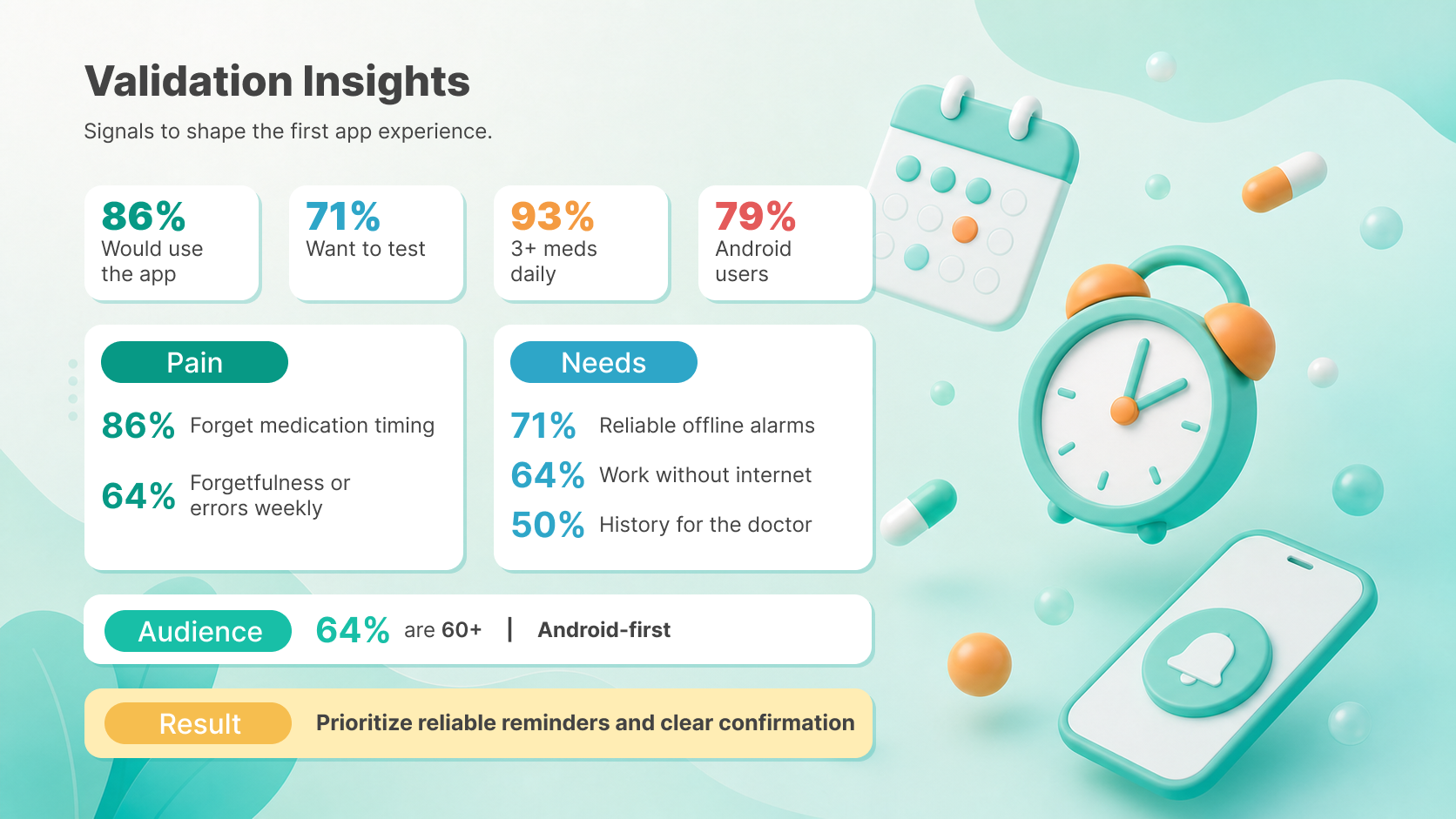
The survey signals were practical: 86% reported forgetting medication at the right time, 71% reported doubt about whether a medication had already been taken, 79% were on Android, and 71% prioritized reliable alarms that work offline.
2. From prototype to Android MVP
Using those inputs, I created a PRD with ChatGPT and used it to generate the first version in Lovable. I made early product and design decisions in Lovable, then moved the web implementation into Claude Code to continue the app development.
I then used ChatGPT to evaluate the technical architecture, compare technology options, and decide what to use. React Native was chosen because it is widely used, mobile-friendly, and well understood by AI coding tools. Supabase was selected for the database and backend.
In less than 8 hours from the start of the project, I had an MVP running on Android with notifications triggered from medication data registered through the web interface.
3. Distributing builds for testing
Firebase App Distribution was used to distribute Android builds to testers until version 0.8.0. After that, the testing workflow moved to Google Play Internal Testing and is now being prepared for Google Play Closed Testing.

The timeline connects the tool choices to the product decisions: research and scoping first, then prototype, Android build, testing, and beta refinement.
4. What the beta includes
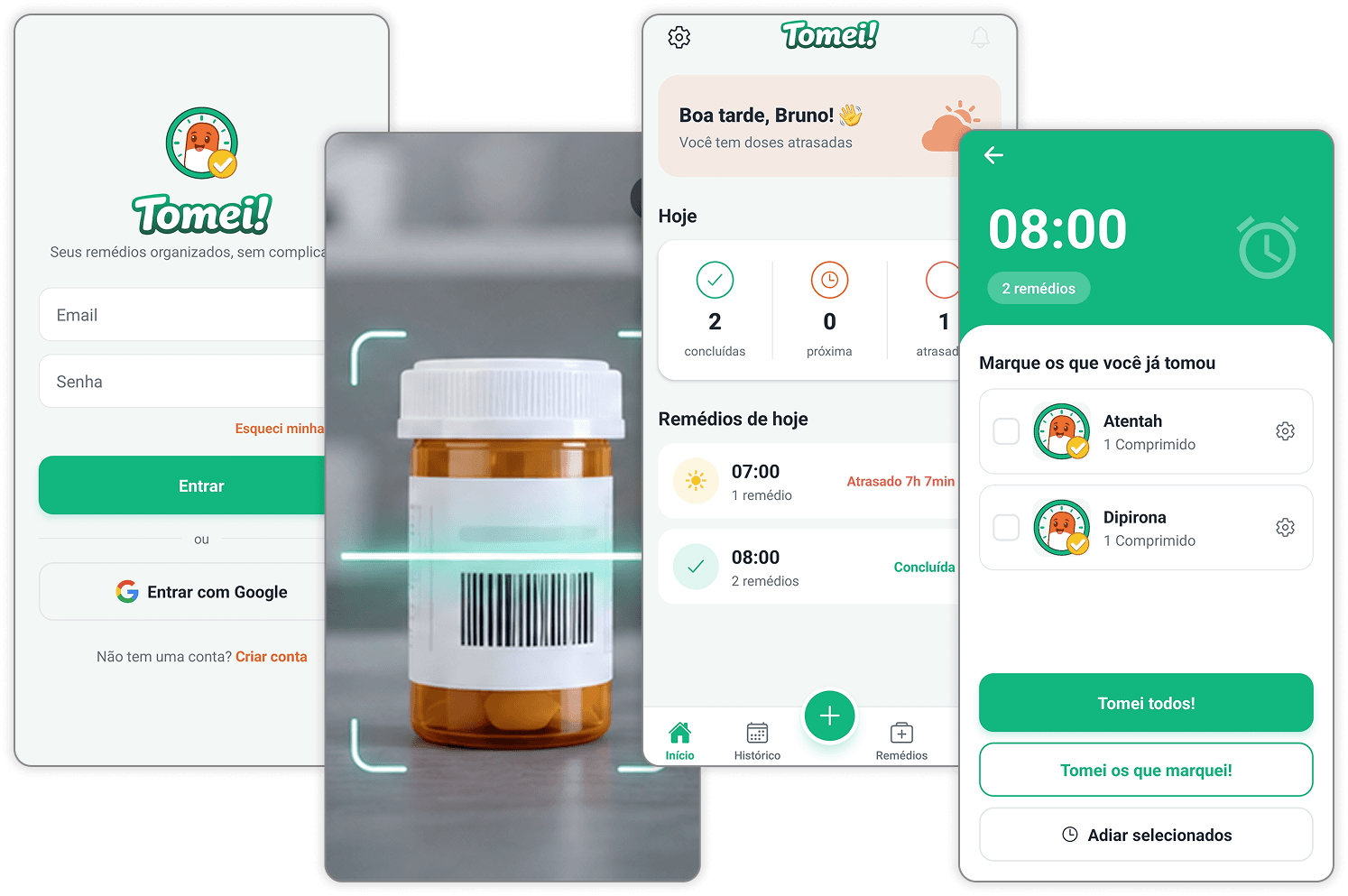
- Google social login and email/password login.
- Medication registration.
- Barcode scanning to pre-fill medication details and reduce manual typing errors.
- Schedule and dosage setup.
- Medication reminders and notifications.
- Mark-as-taken confirmation.
- Support for taking multiple medications at the same time.
- Ability to mark or postpone medications separately, even when they share a schedule.
- Medical notes.
- Screens for taken medications and upcoming medications.
- Medication editing and deletion.
- Web-based medication editing.
5. Refining the interface together
Mariana is currently leading the UI refinement in Figma. Together, we collected visual references and used ChatGPT to generate additional directions based on screenshots of the working app; I am using the new UI to improve the current Lovable/Claude-generated interface.
6. How I used AI during development
AI tools accelerated the work, but they did not define the product.
I used ChatGPT for brainstorming, PRD creation, technical architecture analysis, and reference generation. I used Perplexity for early problem research. Lovable helped create the first web prototype. Claude Code helped continue the implementation, build the Android prototype, debug issues, and iterate quickly.
The product direction, scope decisions, UX structure, validation plan, and acceptance of what was good enough for testing were human decisions.
One important pattern emerged during development: when Claude Code tried to fix the same bug multiple times without solving it, I stopped the loop, isolated the problem, researched it with another AI tool or Google Search, and returned to Claude Code with a clearer solution path, giving directions when needed.
The goal was not to depend on AI. It was to use AI as extra hands and to speed up my thinking process: I could define where the product needed to go and use AI to help translate that direction into working software faster.
Validation
Tomei has gone through four testing rounds with different users of different ages.
The first user test happened after roughly 20 hours of work:
- 6 users tested the product.
- 4 tested remotely.
- 2 tested in person.
The product later reached beta 0.9.3 and entered its 4th testing round:
- 13 Android users are currently testing it, and the group is being expanded to 14 testers for the Google Play release requirement.
- Testing includes both remote and in-person participants.
- 4 users are already using it daily as if it were released.
- We are currently looking for new volunteer testers before the public release.
Some users are already relying on Tomei to remember their medications and waiting for the Tomei reminder so they can mark the medication as taken.
What changed after testing
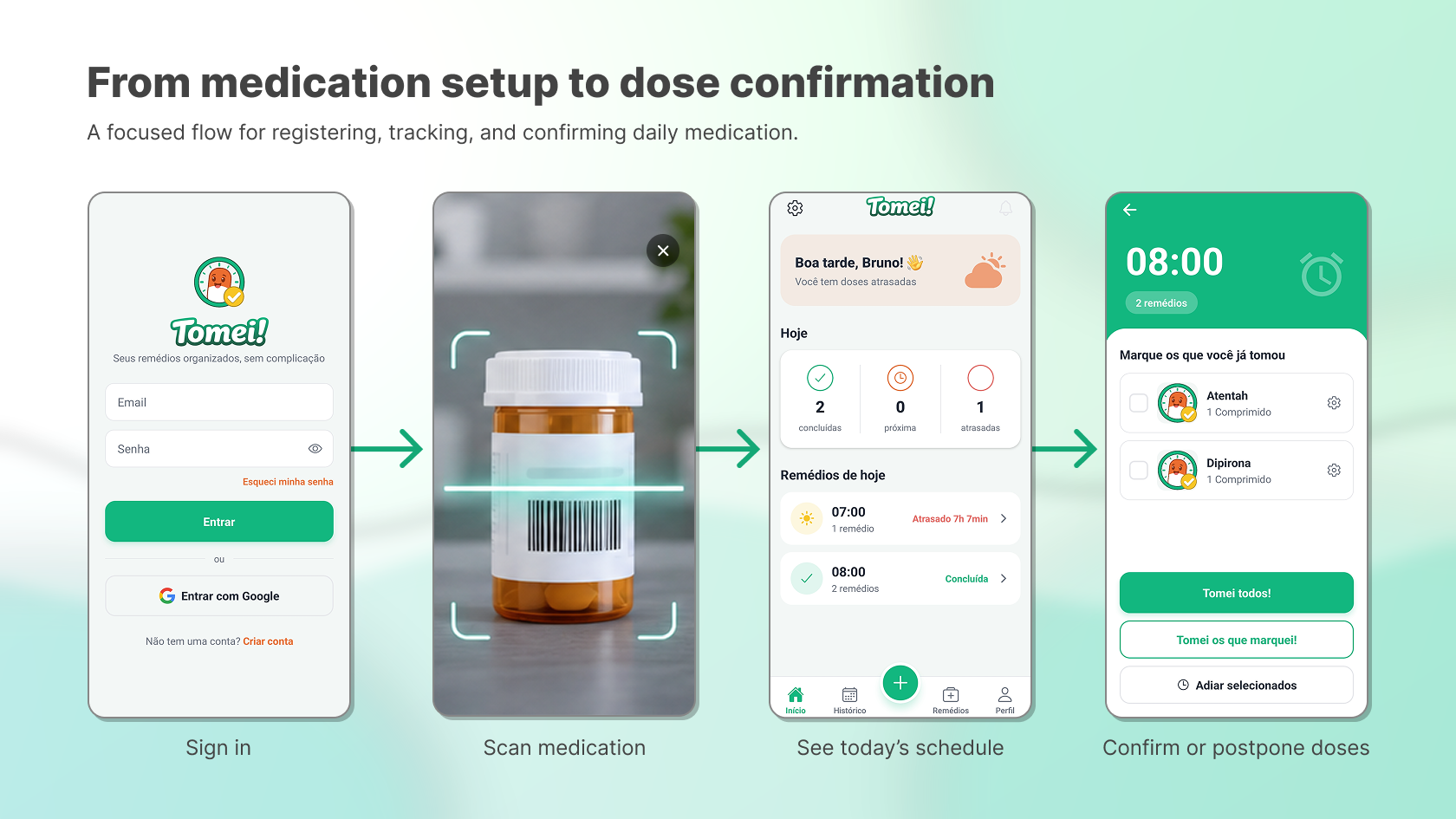
The current medication setup flow brings together the improvements described below, from barcode scanning to scheduling a dose. Watch the working Android app with English captions.
1. Focusing on the person taking medication
Problem observed: The first version had separate experiences for registering medications and following medication progress. This made the product feel like two apps in one.
Change made: The MVP was simplified around the person taking the medication. Users wanted to open the app, register their own medications, and, if needed, install it on the phone of the person they were helping.
2. Simplifying medication setup
Problem observed: Older users had difficulty filling long medication forms, especially when the form extended beyond one page.
Change made: The medication setup flow was redesigned as a step-by-step wizard to reduce errors and avoid missing required information.
3. Reducing manual typing with barcode scanning
Problem observed: Medication names were difficult to type and easy to misspell.
Change made: Barcode scanning was added to pre-fill medication details and reduce manual entry.
4. Making the add action easier to find
Problem observed: Some users did not understand that a plus icon on the top was used to add a new medication. They tried to use the search field to add medication, but the search field was only for medications already registered.
Change made: The interface is being updated with a larger, clearer "Add new medication" button in the middle of the screen, and the search placeholder will clarify that it searches existing medications.
5. Setting a sensible default for dosage quantity
Problem observed: The "quantity to take" field used a placeholder like "Ex. 1". Users often left the field empty when the intended quantity was one, which caused the value to remain zero. Change made: The field now defaults to 1, so if users do not change it, the saved quantity is still correct.
6. Fixing inconsistent reminders
Problem observed: Some users reported inconsistent alarms. Notifications worked at some times but not others.
Change made: I used Claude Code to investigate, locate, and fix the notification issue.
Impact
The project is still in beta, but it already has concrete signals:
- MVP running on Android with notifications in less than 8 hours.
- First user test after roughly 20 hours of work.
- 4 testing rounds completed with users of different ages.
- Beta 0.9.3 is being tested by 13 Android users, with the group expanding to 14 testers for the Google Play release requirement.
- Beta 0.9.3 is in Google Play Internal Testing with a full new interface and is moving toward Closed Testing.
- 4 users are already using the product daily.
- Barcode scanning was added to reduce medication-name typing errors.
- The medication setup wizard was added to reduce incomplete or incorrect registration.
- A real notification reliability issue was discovered through beta use and fixed.
- The product scope was reduced after testing, making the MVP simpler and more realistic for release.

The next milestone is version 1 live on Google Play. The immediate focus is finishing the 0.9.3 test round, moving into Google Play Closed Testing, recruiting new volunteer testers, and completing the final UI improvements before release.
What I learned
The most important lesson from Tomei is that AI can accelerate execution, but it should not command the product.
For AI tools, almost everything feels possible. They tend to push toward the "best" version, but the best version can easily become an endless version instead of the necessary version.
Tomei became better when I reduced the original idea, focused on a simpler first release, and planned the caregiver/family workflow as a longer-term expansion.
AI worked best as an extension of my own reasoning: a programming partner, an extra pair of hands, and a way to move faster through implementation. It still required product judgment, user testing, debugging, constraint-setting, and knowing when to stop an AI loop and reframe the problem.
The product also reinforced a core design lesson: for medication routines, reliability and clarity matter more than feature quantity. A simple flow that helps someone take the right medication at the right time is more valuable than a large system that is harder to understand.