Snapshot
Role: Lead Product Designer / Design Engineer
Status: Internal web tool hosted at remonkei.brunix.studio; 2 fixed users; 3 months of closed testing
Built with: React 18, TypeScript, Vite, Tailwind CSS, shadcn/ui, Lucide React, html2pdf.js, serverless TypeScript API functions and Express for local development, PostgreSQL on Neon, cookie-based sessions, Vercel, Vitest, Playwright
AI-assisted workflow: Lovable for the first product/UI generation and Codex for implementation, Claude Code for debugging, bug fixing, and ongoing iteration
Research & validation: Real use while freelancing, comparison against a paid Clockify workflow, monthly invoice cycles, closed testing with Mariana Hortência on UX and product feedback
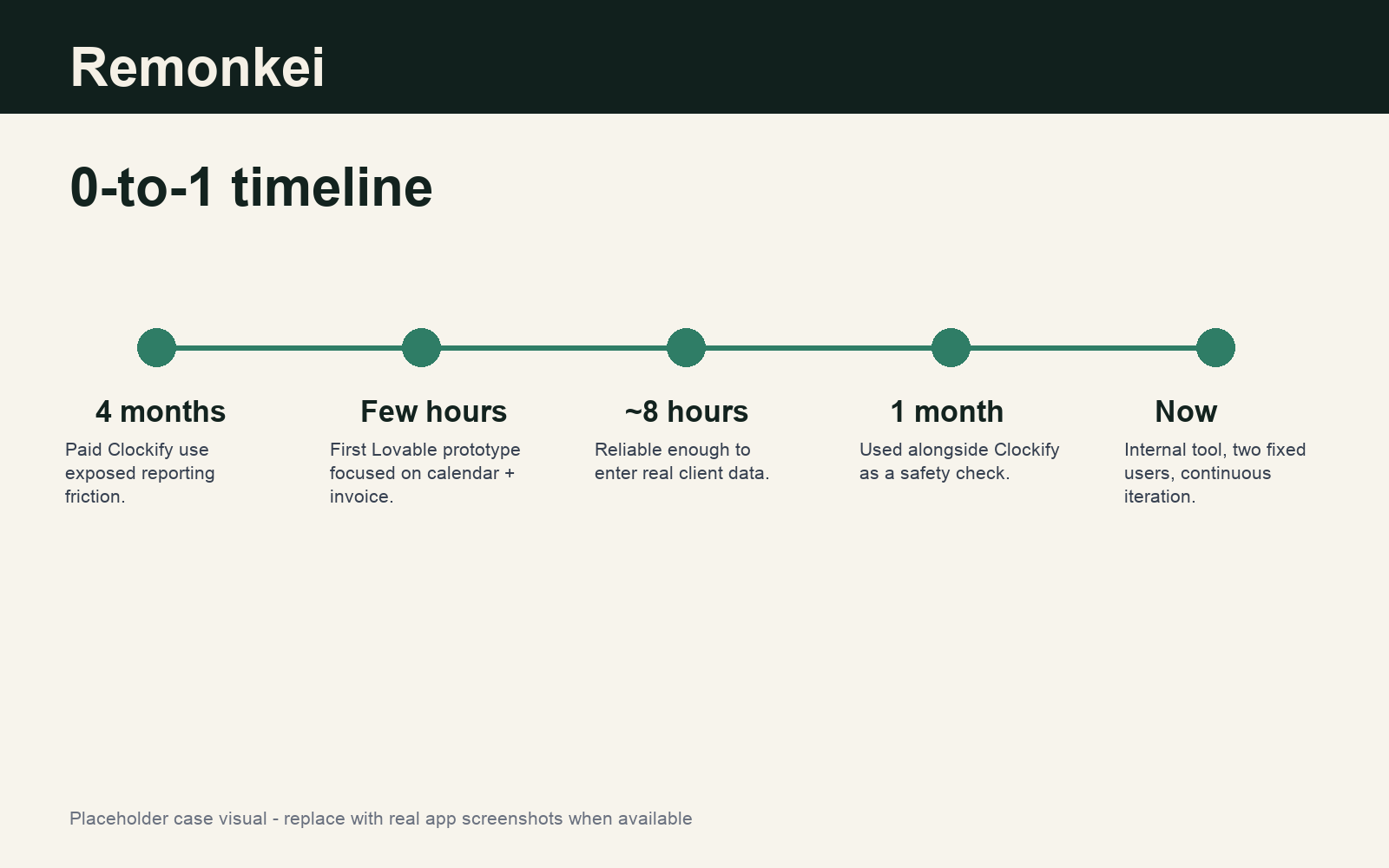
Timeline: First prototype in a few hours; about 8 hours to a reliable version with real data; one month of parallel use with Clockify; ongoing development after 3 months of testing
Impact: Replaced a recurring 2-3 hour month-end manual invoice workflow with a few-click PDF generation flow; enabled clearer planning and client prioritization; Clockify was cancelled after the first successful invoice cycle.
Project link: https://remonkei.brunix.studio
Access note: Remonkei is currently an internal tool with closed testing. People can sign up, but access requires manual approval; testers can contact me on LinkedIn to be approved.

Problem
Remonkei started from my own freelance workflow.
After becoming a freelancer, I had a recurring problem: tracking the work was not the same as preparing a professional invoice. I tested different tools and spent four months on a paid Clockify plan. Clockify worked well for logging tasks in a calendar and reviewing how many hours I had spent on each task at the end of the month.
The problem came after tracking.
The generated report was too complex for my invoice needs. It included several fields, divisions, and details that were useful for reporting but not useful for a clean billing document. There was no automatic way to simplify it into the invoice format I needed, so I still had to filter data, copy hours, move tasks into Excel, calculate values, and rebuild the document manually.
Compared with using Excel alone, the gap was even bigger. Whenever I returned to the same task, I had to add new hours to previous hours while keeping the individual records separate. The process was slow, repetitive, and easy to mess up.
The core problem was simple: freelancers who charge by the hour often record work in one place and create invoices somewhere else. That gap creates manual work exactly at the moment when the user wants to close the month and get paid.
Bet
The initial product bet was:
If I build a focused web tool for hourly freelancers around only the essentials - task name, time spent, date, rate, and billing period - freelancers can move from work planning to a ready-to-send invoice in one or two clicks because the invoice becomes a byproduct of the work log.
The goal was not to rebuild a broad time-tracking platform. It was to make the freelancer billing workflow smaller, clearer, and more directly connected to the monthly invoice.
Build
1. Defining the core workflow
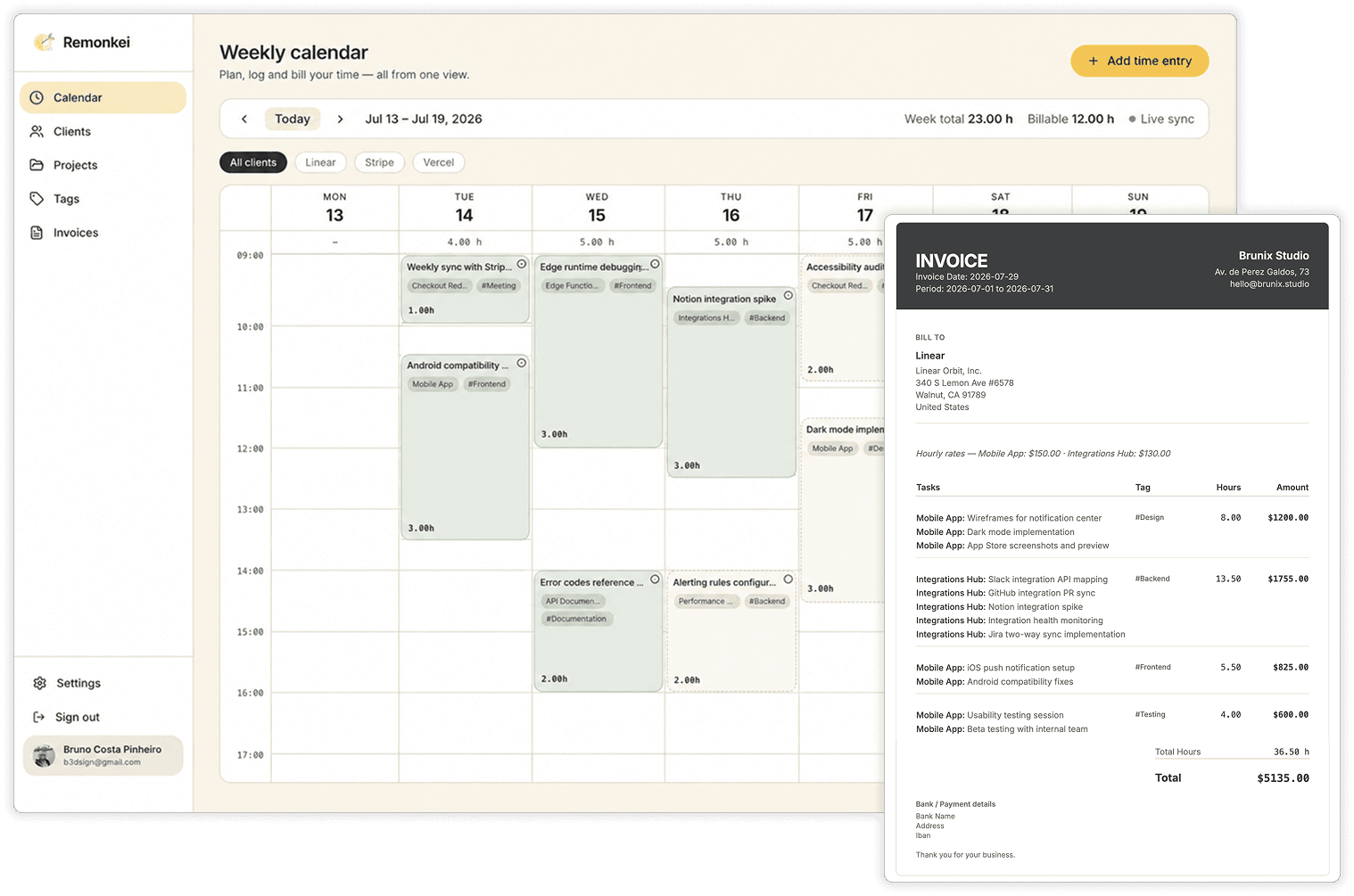
Remonkei is a web workspace for organizing clients, projects, tasks, tags, planned work, completed hours, and invoices.
The current version includes:
- Client and project management.
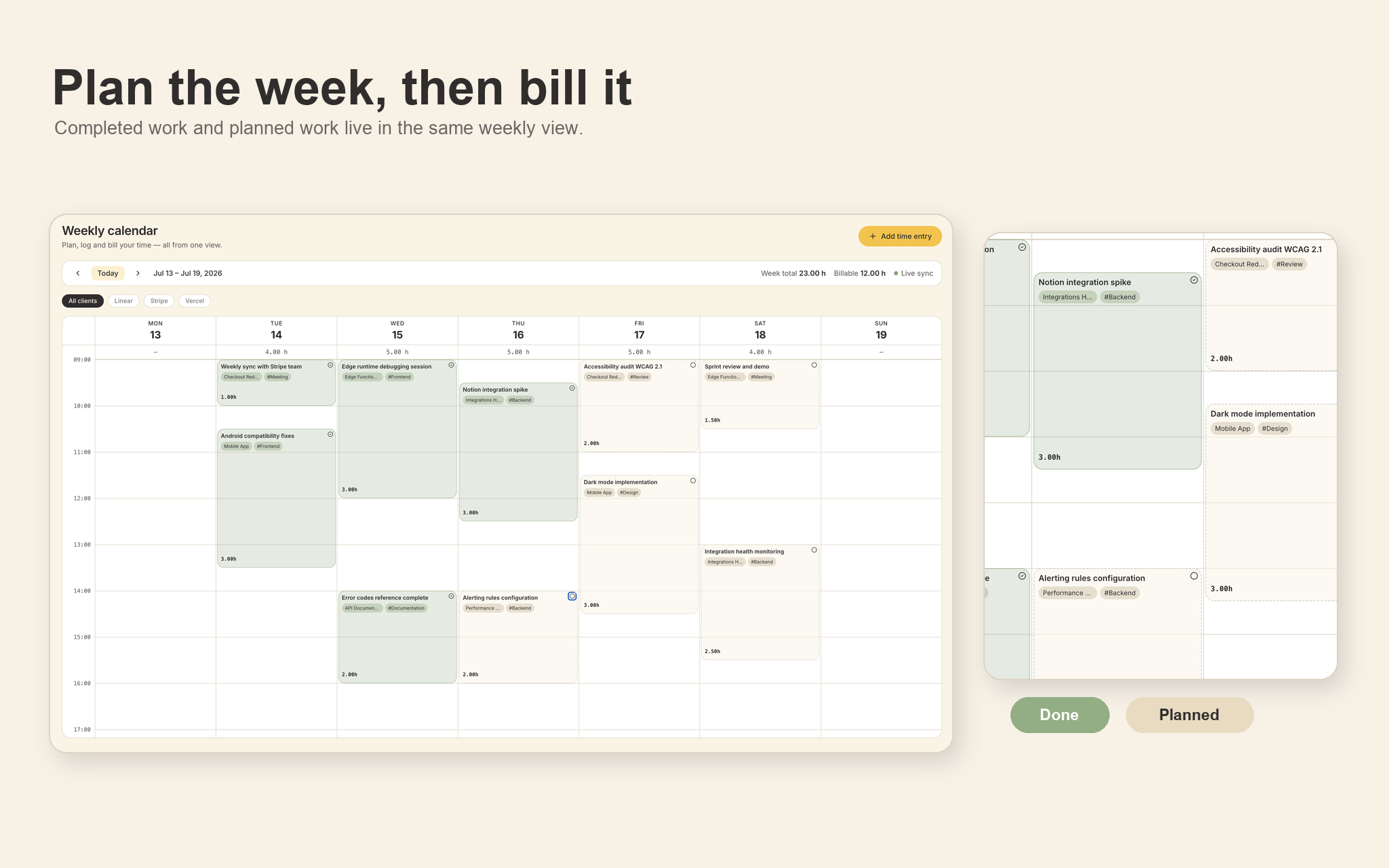
- A visual weekly calendar.
- Planned vs done task states.
- One-click PDF invoices.
- Cloud sync and backup.
- Tags and smart organization.
- Invoice preview by client and billing period.
- Saved final invoices that can be downloaded later.
- Recurring task planning for repeated work, such as weekly meetings.
2. Connecting planning and completed work
The main flow starts when a client request arrives. I estimate the work, create or place the task in the calendar, and reserve time for it. If the task takes more or less time than expected, I adjust the calendar block. By the end of the billing period, the system already has the client, project, task, date, duration, and rate data needed to generate an invoice.
3. Reviewing and generating invoices
The invoice flow was designed around confidence before export. The user can generate a monthly preview without saving it, which makes it easier to check how the period is going. When the final invoice is generated, it is saved and can be downloaded as a PDF at any time.
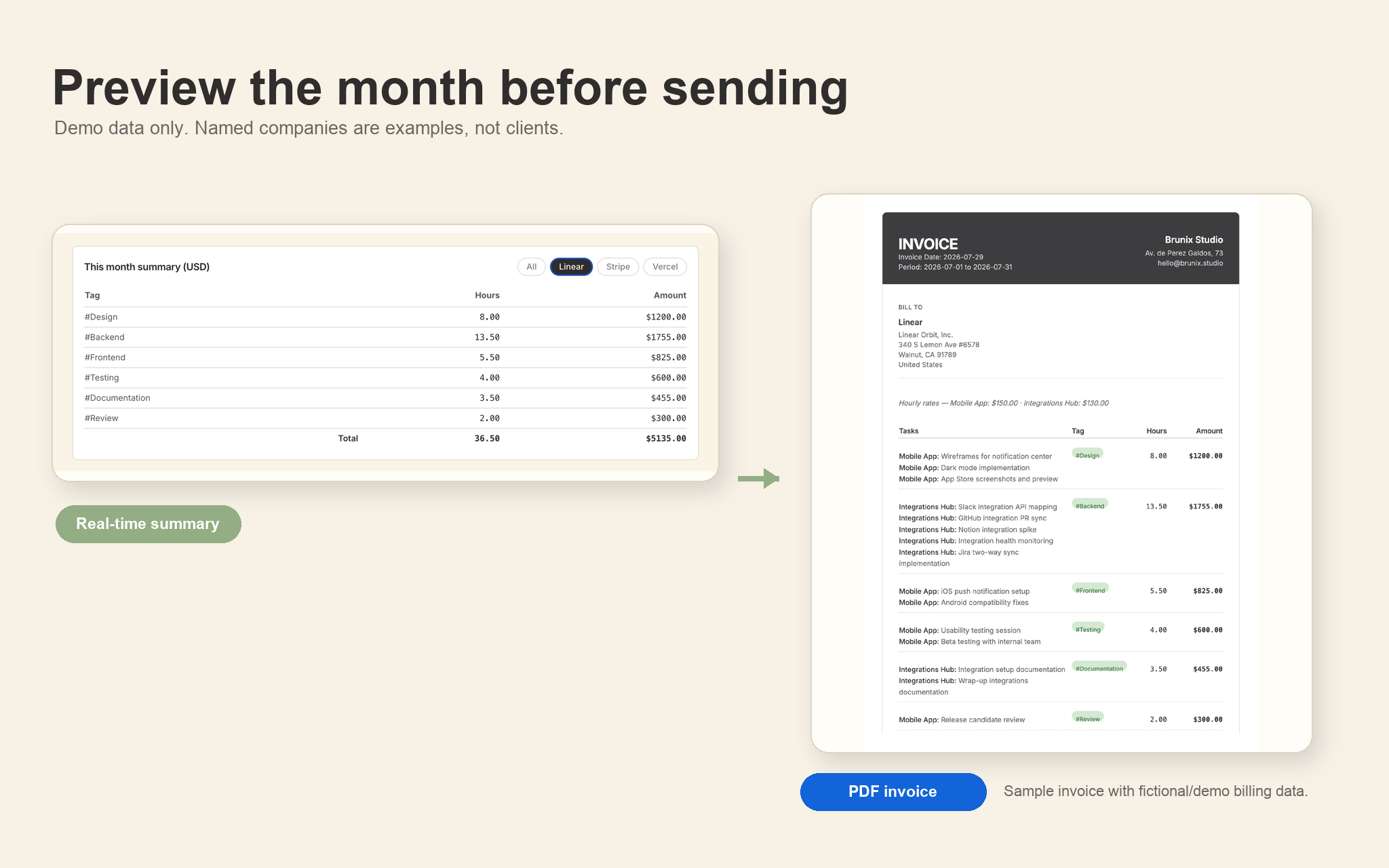
View the sample invoice PDF. The companies and billing details shown here are fictional/demo data used to demonstrate what Remonkei can generate; they do not represent real client relationships.
4. Reducing repeated setup and invoice clutter
Client, project, and invoice settings are also stored so the user does not repeat the same setup every month. Rates, currencies, sender information, and backup controls stay close to the billing workflow.
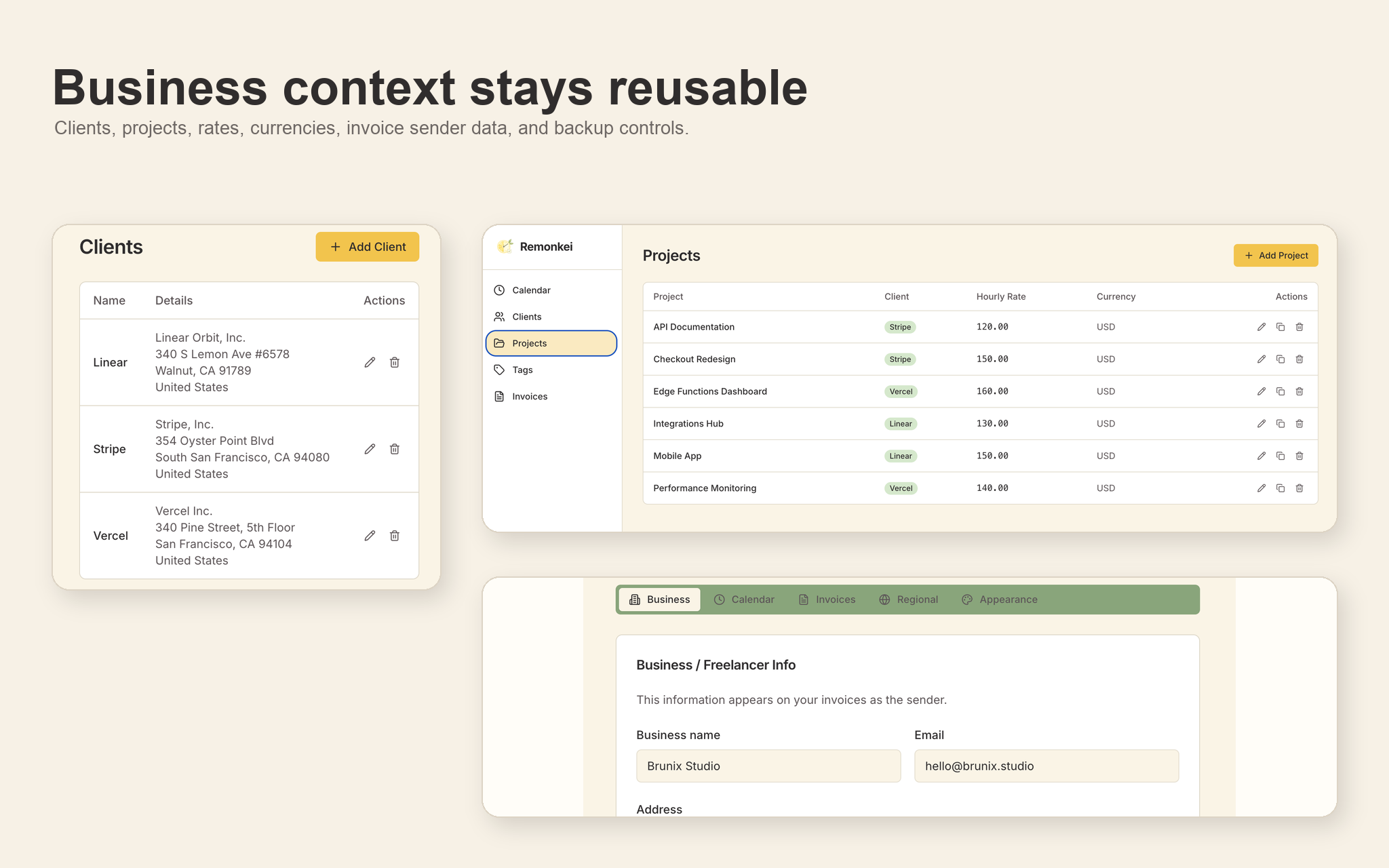
A key UX decision was consolidating repeated tasks. If the same activity happened on different days, the invoice does not need to show every duplicate line. Remonkei can present that work once, with the hours summed, making the invoice easier for the client to read.
5. Building the working product
The stack is intentionally web-focused:
- Frontend: React 18 + TypeScript.
- Build/tooling: Vite.
- Styling: Tailwind CSS + shadcn/ui.
- Icons: Lucide React.
- PDF generation: html2pdf.js.
- Backend/API: serverless TypeScript functions, with Express for local development.
- Database: PostgreSQL hosted on Neon.
- Authentication: cookie-based session with a configurable access password.
- Deploy: Vercel.
- Testing available: Vitest and Playwright.
6. How I used AI during development
AI accelerated almost every implementation step, but it did not replace product judgment.
The idea, product direction, scope, testing, and acceptance criteria came from my own freelance workflow. Lovable helped create the first version quickly, especially the initial UI and product shape. I used Codex to continue implementation, fix bugs, and make database persistence reliable. I now use Claude Code to maintain and improve the tool based on real use.
Mariana Hortência, UX partner at Brunix, also uses and tests the app today, bringing a second real workflow into the feedback loop.
The strongest AI-related lesson came from the first major bug pattern: Lovable uses mock data while developing UI, and if the implementation is not carefully reviewed later, those mock or local data paths can remain in the product. For a while, some forms appeared to work but were not reliably writing to Neon. Once I understood the issue, I changed the direction: no hidden local persistence, always save to and read from the database, and treat Neon as the source of truth.
Validation
Remonkei has been tested through real monthly freelance cycles for three months.
At first, I used Remonkei and Clockify in parallel as a safety check. I wanted to know whether the new tool could handle real client data, generate the invoice correctly, and replace the paid tool without creating risk at the end of the month.
After the first month, generating the invoice in Remonkei was easy enough that I cancelled Clockify and continued using Remonkei as the main workflow.
What changed after testing
1. Making data persistence reliable
Problem observed: Some forms kept local or mock data paths from the AI-generated UI stage and did not reliably save to Neon.
Change made: I shifted the implementation rule to database-first behavior: no hidden local data, always save and fetch from Neon as the source of truth.
2. Separating planned work from billable time
Problem observed: Planning future work in a time-tracking tool could be confusing because planned work and completed work looked too similar.
Change made: Remonkei added planned vs done behavior, so future tasks can be placed in the calendar without being mistaken for completed billable time.
3. Scheduling recurring tasks
Problem observed: Recurring work, such as a weekly team meeting, should not require manual recreation every week.
Change made: Remonkei added recurring task planning so repeated work can be scheduled without recreating the same task manually.
4. Previewing invoices before saving
Problem observed: Users need to check the month before closing an invoice, but that draft should not necessarily become a saved billing document.
Change made: Remonkei supports an invoice preview for the selected period before generating the final saved invoice.
Impact
The clearest impact is the removal of a recurring manual workflow.
Before Remonkei, the last day of the month often required 2 to 3 hours of filtering reports, copying tasks, moving hours and values into Excel, checking totals, and assembling a professional invoice. With Remonkei, that work becomes a few-click flow: choose the client and period, review the preview, generate the final invoice, and download the PDF.
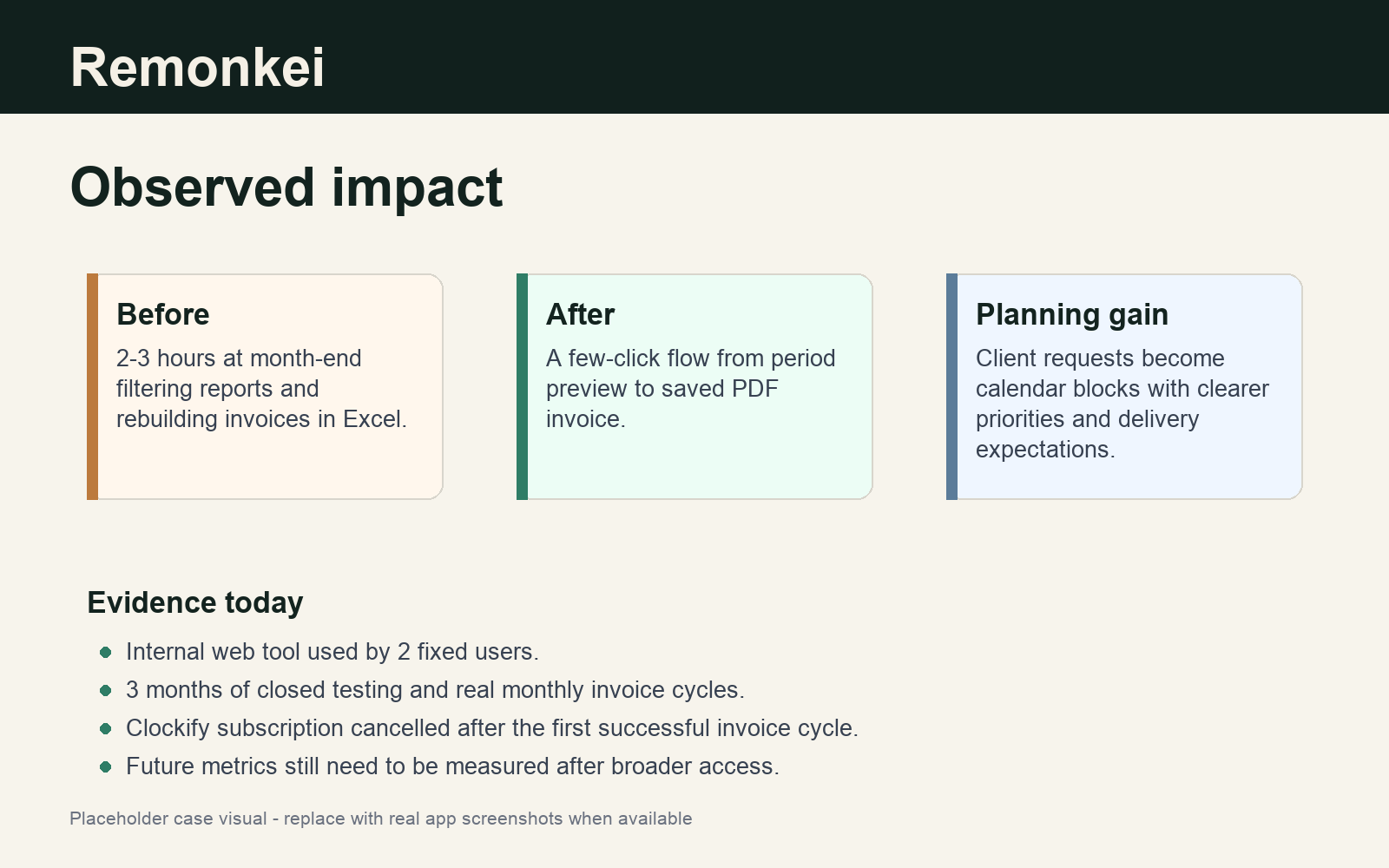
The product also changed the planning workflow, not only the billing workflow. When a client sends a new request, I can estimate the time, reserve a slot in the calendar, and adjust it later if the work takes more or less time. That makes it easier to explain prioritization and delivery expectations to the client. If the client wants to change priorities, the future calendar makes that trade-off visible.
The honest evidence today is qualitative but concrete:
- Remonkei has 2 fixed users in closed internal testing.
- It has been used for 3 months of real freelance planning and invoice cycles.
- It replaced a paid Clockify workflow for my own use.
- It reduced a recurring 2-3 hour month-end invoice process to a few-click PDF workflow.
- It improved communication around prioritization because future work can be planned directly in the calendar.
Broader adoption, retention, and exact time-saved metrics still need to be measured after more users test the product.
What I learned
1. Defining the database as the source of truth
The biggest lesson from Remonkei was that AI-generated UI can hide product-state problems if I do not inspect the data layer carefully.
Mock data is useful when an AI tool needs to make an interface feel real, but it can become dangerous if it remains connected to forms, lists, or flows after the product starts using real data. In Remonkei, that created bugs where parts of the app looked functional but were not saving correctly to Neon.
That changed how I work with AI-assisted builds. I now define source-of-truth rules earlier, especially for products that depend on persistent data. For Remonkei, the rule became simple: the database is the source of truth.
2. Knowing when to step in and investigate
The second lesson was about operator responsibility. When an AI agent gets stuck on the same issue, the answer is not to keep prompting blindly. I need to stop, inspect the problem, search for solutions in the old way when necessary, compare options, and bring a clearer path back to the AI. That pattern solved the problems I hit during this build and made the AI workflow more reliable.